Your saving challenge,organized.
Set a goal. Track your progress. Complete your challenge.

Built for people who want to see progress
No spreadsheets. No guilt. Just you, your goal, and cells that add up.
Multiple challenges
Create multiple goals and track each one with clear targets and deadlines.
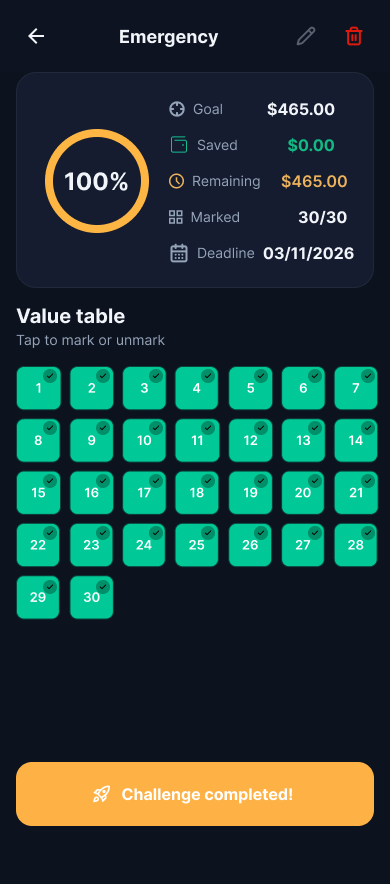
Interactive grid
Tap, mark, and track your progress in real time.
Progress chart
See your progress clearly and stay focused until you reach your goal.
Create & tweak
Create goals easily and adjust whenever you need — without losing your progress.
Google Drive backup
Back up to your Google Drive securely. Your data stays yours.
Batch deposit
Enter an amount and the app marks the matching values for you — instantly.
Simple to understand. Easy to follow.
Your goal becomes small steps. Just keep marking them off.
1. Goal
Set how much you want to save. The app builds the path for you.
2. Grid
Tap to mark what you've saved, one value at a time.
3. Win
Complete the steps and reach your goal.
Inside the app
Screens from first launch to a completed board.
Frequently Asked Questions
Not for daily use. Only if you enable Google Drive backup.
No. Everything stays on your device. Optional backup goes only to the app's folder on your Google Drive.
Yes. The app is free and contains ads.
You can edit name, amount, and deadline. Already-marked values that still fit the new range remain.
In Settings, sign in with Google and enable backup. The app saves a file to the app's hidden folder on your Drive — only the app can read/write there. You can restore challenges on another device or after reinstalling. It's optional: without it, everything stays on your phone only.
Yes. A one-time in-app purchase removes all ads permanently — banners, interstitials, and native ads.
Start your next challenge
Free on Google Play. Download and start saving today.